
Drop your PDF here to convert to EPUB
Text is extracted, chapters are detected automatically, a valid EPUB is built
EPUB preview will appear here
PDF To EPUB Converter is a simple & effective PDF to EPUB eBook conversion tool. Convert PDF files to well-formatted and easy-to-navigate EPUB format on your smartphone, tablet, other Kindle-compatible application, Kobo, Apple Books or any eReader.
Unlike PDF files which are fixed to one specific size only, EPUB automatically changes the size and spacing of text and adjusts to the screen-size that is being read. This makes the reader enjoy more reading their EPUB on different portable devices. Added to that, EPUB also provides text searching, bookmarking, zooming functions, as well as other added accessibility features.
It is a common tool among students, teachers, publishers, researchers, authors and readers, all having the need for more portability and readability. Therefore a reliable and safe converter is needed to keep your documents safe and reading will turn more pleasing.
This extensive PDF to EPUB Converter Guide will show you everything you need to know about PDF To EPUB Converter, its benefits, supported file formats, major features and best practices for high quality EPUB conversion.
What Is PDF To EPUB Converter?
PDF to EPUB converter turns your PDF file into EPUB e-readers or even display this on your tablet and cell phone in general. It basically translates your paper content including headings and document layout, images plus body to a portable eBook so that reading is enhanced. The size of characters adjusts naturally with personal appliances.
So, what is a PDF to EPUB Converter?
A PDF to EPUB converter converts any ordinary PDF to the EPUB eBook file type standard. Why EPUB? EPUB, unlike PDFs, is reflowable — meaning that text and images automatically align with the dimensions of your screen.
Important elements of documents are preserved in modern converters, such as:
- Headings
- Paragraphs
- Images
- Hyperlinks
- Chapters
- Metadata
- Basic formatting
- Table of contents
The EPUB file is very good for books, manuals, study articles, teaching and any longer file format.
Why You Need a PDF To EPUB Converter
Compared to reading PDF files on smaller screens, a professional PDF To EPUB Converter has several benefits.
These are some of the key advantages:
- Responsive reading experience
- Adjustable font sizes
- Better mobile compatibility
- Improved accessibility
- Smaller file sizes
- Easy navigation
- Searchable text
- Cross-platform support
- Better eReader compatibility
- A user-friendly digital library management system
Furthermore, the popular reading applications support it well and it is ideal for personal and professional use.
How a PDF To EPUB Converter Works
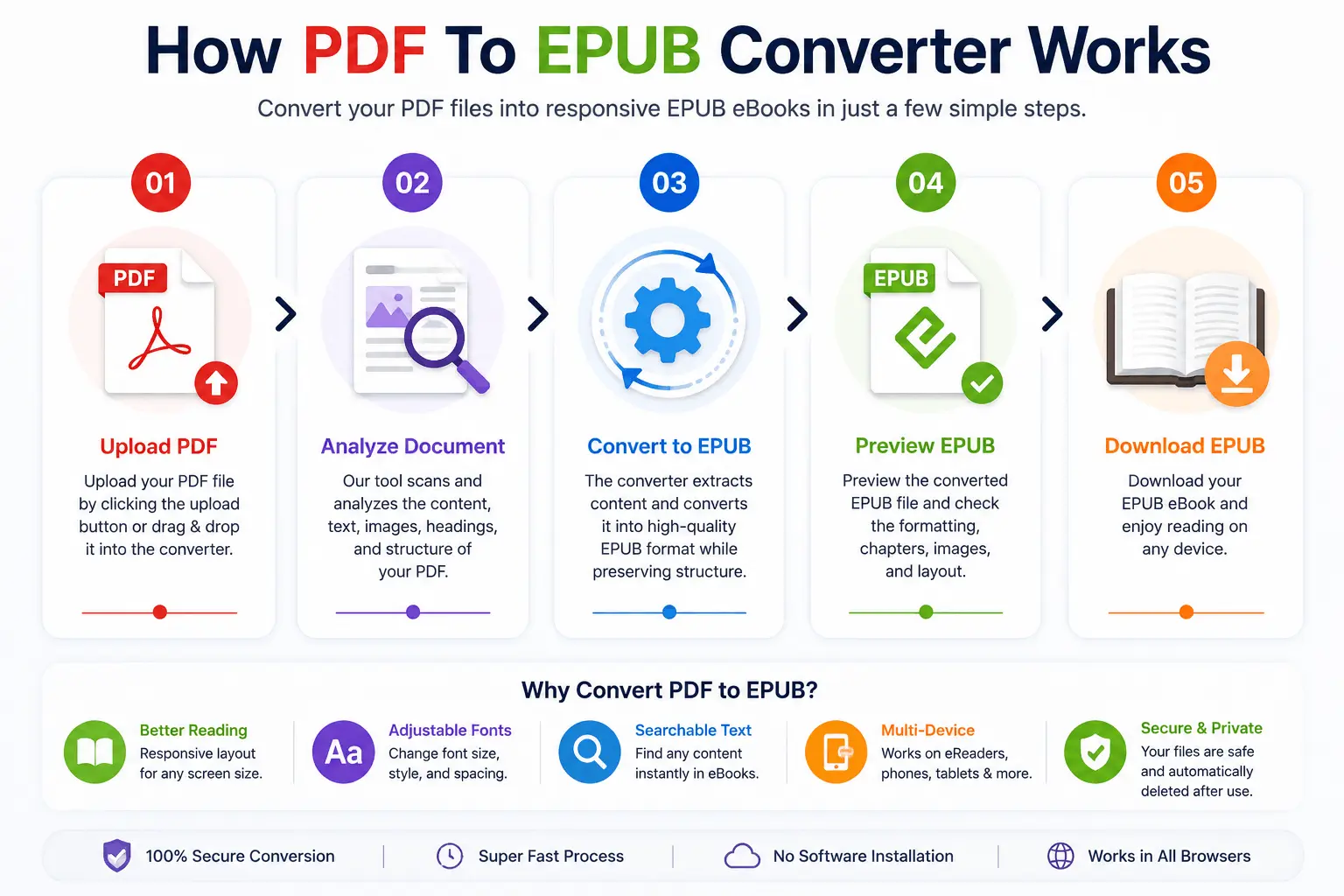
This Converter has a smart conversion procedure that creates well-made eBooks.
Upload Your PDF
Choose your PDF document from your device or drag and drop it into the converter.
Analyze the Document
The converter reads the document and extracts text, images, headings, chapters, paragraphs, hyperlinks, and metadata. The document will be scanned and the OCR will be used to get readable text before conversion.
Generate EPUB Structure
The extracted content is organized into chapters and sections that are acceptable for EPUB while maintaining readability and formatting as much as possible.
Optimize the eBook
Advanced converters tweak typography, page flow and metadata to make it compatible with new eReaders.
Download the EPUB File (Free)
Last but not least, download your EPUB eBook and open it in your reading software or eReader.
Key Features of a PDF To EPUB Converter
⚡ Fast PDF To EPUB Converter
This process is almost done in live-time — in a few seconds — as a result of that individuals concerned have the ability to create digital books.
🎯 High-Quality Conversion
Professional converters preserve text, images, paragraphs, headings, hyperlinks, basic formatting, and reading structure.
🔍 OCR PDF To EPUB Converter
Through the usage of OCR technology, scanned PDF documents could also be converted into a searchable and editable format, like an EPUB file.
🌐 Browser-Based PDF To EPUB Converter
As a converter available on browsers, you don’t need to install anything on your computer.
🔒 Secure PDF To EPUB Converter
When you’re done with your tool and uploading documents, rest assured that encrypted connections are secured along with automated deletion of any uploaded files.
📱 Cross-Platform Compatibility
Available on Windows, macOS, Linux, Android, iPhone, iPad, and Chromebook.
A PDF to EPUB Converter Offers Numerous Advantages
The merits of a PDF to EPUB converter are many, including:
- Better Reading Experience — EPUB automatically resizes for easy reading on devices of varying screen size.
- Adjustable Fonts — Users may select font size, spacing and display to suit their needs.
- Improved Accessibility — EPUB can be used with accessibility features that can assist users with various reading preferences.
- Smaller File Sizes — Optimized EPUB files may be more efficient to store and share.
- Enhanced Device Compatibility — EPUB capabilities include many popular eBook readers and mobile reading applications.
Supported File Types
A professional PDF To EPUB Converter usually has the following capabilities:
- Standard PDF
- Scanned PDF (OCR)
- Text-based PDF
- Image-based PDF
- Multi-page PDF
- Books
- Manuals
- Research papers
- Academic documents
- User guides
- Reports
- Educational materials
Who can use PDF to EPUB Converter?
Many different users can use a PDF To EPUB Converter. Common users include:
- Students
- Teachers
- Researchers
- Authors
- Publishers
- Editors
- Content creators
- Business professionals
- Librarians
- Digital marketers
- Educational institutions
- eBook readers
- Training organizations
- Freelancers
- Anyone with an interest in a better digital reading experience
These users all experience enhanced readability, layout options and compatibility with many modern devices.
Why Readers Prefer a PDF To EPUB Converter
Makes your digital document easier to read. Your PDF To EPUB converter enables you to transform static, difficult-to-navigate PDF pages into fluid EPUB e-books which will always fit their respective screens and which will allow for different reading sizes! Additional factors like typography are another point for the EPUB — font selections are richer and the display smoother — therefore, university students as well as publishers have a tendency to adopt this format to prepare and to read any longer length and of considerable amount.
- Better reading experience
- Responsive text layout
- Adjustable font sizes
- Lightweight eBook files
- Improved accessibility
- Cross-device compatibility
- Faster navigation
- Easy library management
PDF To EPUB Converter Functions that Count
Choosing a PDF To EPUB Converter, the choice becomes more effortless if you know exactly which feature would improve conversion.
🧠 Intelligent Content Recognition
A high quality PDF To EPUB Converter automatically detects chapters, headings, paragraphs, images, lists, hyperlinks, and metadata. The converted EPUB file preserves the logical reading structure as a result.
📄 OCR Support for Scanned PDFs
There are books and printed documents that are only available as a PDF scan. An OCR-enabled PDF to EPUB Converter can recognize printed text, extract editable content, detect page structure, improve reading accuracy, and create searchable eBook in EPUB format.
📦 Batch PDF To EPUB Converter
Users with multiple documents can benefit from batch conversion. Multiple PDF files are converted at the same time, saving processing time, improving workflow efficiency, and helping manage digital libraries more easily.
📱 Responsive EPUB Formatting
Unlike PDF documents, EPUB files automatically adjust to screen size, font size, line spacing, orientation, and device resolution. As such, reading becomes much easier on smartphones, tablets and dedicated eReaders.
🔐 Secure File Processing
Security is a crucial component in personal or business document conversion. The trusted Converter tools generally offer HTTPS encryption, secure uploads, automatic file deletion, private cloud processing, and safe downloads.
🌍 Cross-Platform Compatibility
This Browser PDF to EPUB Converter has extensive compatibility. It supports more or less most mainstream operating systems in the market. As it is all on-line, there is no software installation required.
PDF To EPUB Converter vs Reading PDF Directly
There are a number of important benefits to having an EPUB format instead of reading the PDF on a smaller device.
| Feature | EPUB | |
|---|---|---|
| Responsive Layout | ✔ | ✘ |
| Adjustable Fonts | ✔ | ✘ |
| Comfortable Mobile Reading | ✔ | Limited |
| Reflowable Text | ✔ | ✘ |
| Lightweight Reading | ✔ | Moderate |
| eReader Support | Excellent | Limited |
| Accessibility | Better | Moderate |
So all considered, EPUB provides a better and more flexible reading experience.
PDF To EPUB Converter vs Manual eBook Creation
EPUB is a manual creation process, which is technically complex and involves the use of specialised software.
| Feature | PDF To EPUB Converter | Manual EPUB Creation |
|---|---|---|
| Speed | ✔ Very Fast | ✘ Slow |
| Difficulty | ✔ Easy | ✘ Advanced |
| Formatting | ✔ Automatic | ✘ Manual |
| Cost | ✔ Usually Free | ✘ Software Required |
| Productivity | ✔ High | ✘ Moderate |
| Learning Curve | ✔ Minimal | ✘ Advanced learning |
A PDF To EPUB Converter is the more convenient and efficient choice for the majority of users.
Typical Applications of a PDF To EPUB Converter
There are numerous cases where a PDF To EPUB Converter comes in handy.
Digital Books
Readers are capable of transforming PDF books to responsive EPUB files which make reading easier.
Educational Materials
Students frequently convert lecture notes, assignments, research papers, study guides, and academic books.
Business Documents
Companies convert training manuals, employee handbooks, product documentation, and company guides.
Publishing
EPUB files are used in the publishing industry for eBooks, digital magazines, educational publications, and instruction manuals.
Personal Reading
Individuals convert novels, travel guides, cookbooks, reference books, and technical manuals.
The Benefits that EPUB Offers Over PDF
While PDF works great for printing and sharing, EPUB was created specifically for eReading.
| Feature | EPUB | |
|---|---|---|
| Layout | Responsive layout | Fixed layout |
| Mobile Reading | Optimized for mobile screens | Challenging on smaller screens |
| Fonts | Customizable fonts | Some fonts are not customizable |
| Text Flow | Reflowable text | Static pages |
| Flexibility | Reader-friendly | Less flexible |
| Format | Suitable for eBook format | Suitable for printing |
Thus, it would be better to implement EPUB as the preferred format for long-form digital reading.
Guide for Converting PDFs to EPUBs with High Quality
Adhering to these suggestions helps to increase the quality of conversions.
- Use High Resolution PDF Files — Clean PDF documents will result in better text recognition, and cleaner formatting of the EPUB documents.
- Allow scanning books to be OCR scanned. — When applied to a scanned document, OCR greatly enhances the ability to search, as well as overall readability of the document.
- Check and make sure that the chapter structure is correct. — After conversion, review chapter titles, table of contents, hyperlinks, images, paragraph spacing, and page breaks. This helps to facilitate the reading process.
- Export to printed PDF or as a single PDF file. — Be sure to have a copy of your original PDF before editing it.
- Test ePub on Multiple Devices — Test readability and formatting on other eReaders or reading applications.
There are many industries that can benefit from the use of a PDF to EPUB Converter
Free PDF To EPUB Converter tools are essential for industries to publish content digitally and to make documents accessible. Examples include:
- Education
- Publishing
- Libraries
- Government
- Healthcare
- Legal Services
- Research Organizations
- Corporate Training
- Marketing
- Information Technology
- Finance
- Nonprofit Organizations
- Consulting
- Media
- Digital Content Creation
These industries are able to gain the advantage of responsive documents, easy distribution and better reading experience.
What happens if there is a large PDF document?
Yes. Today’s PDF To EPUB Converter software can convert the following types of PDFs:
- Multi-page books
- Technical manuals
- Research papers
- User guides
- Educational textbooks
- Documentation
- Reports
- Training materials
- Large PDF files
But if you have documents with complex layouts, decorative fonts or poor scan quality, you will need to make some minor formatting adjustments after the conversion.
How to Use a PDF To EPUB Converter
Free Convert PDF to EPUB. It is just very simple with a few steps using the best tool which is called PDF to EPUB Converter. Using any of the free tool we have compiled for our readers will only take just a matter of a few minutes. The tool allows readers to upload a PDF file online, convert it to EPUB, and download the converted eBook without having any cost involved.
Upload PDF File
In the starting part step, you need to make the uploading process of your PDF file; for this, opening the PDF to EPUB tool and drag the PDF file directly is going to work great and many users found that dragging or dropping is working really fast. You can convert eBooks, research papers, user manuals, reports, educational materials, magazines, technical documentation, business guides, white papers, and academic books.
Analyze the PDF Document
After the upload, the PDF To EPUB Converter scans the uploaded PDF and recognizes text, headings, paragraphs, images, hyperlinks, chapters, tables, and metadata. OCR technology is used to remove readable text from the document prior to conversion, when the document is image based or scanned.
Convert PDF to EPUB
Press the Convert button for conversion. In this process the converter extracts document content, creates EPUB chapters, preserves formatting, optimizes text flow, and creates a responsive eBook format. The conversions take a matter of moments, depending on the file size.
Review the EPUB File
Please check the converted file before saving it as your eBook. Verify chapter structure, images, headings, hyperlinks, font appearance, paragraph spacing, table of contents, and reading order. A rapid scan can help to guarantee the best reading experience.
Download Your EPUB eBook
Once converted, download your EPUB file. You can open it using Apple Books, Google Play Books, Adobe Digital Editions, Kobo Books, Calibre, Thorium Reader, FBReader, and numerous more EPUB reading applications that are compatible. Your eBook is ready for easy reading on any number of devices.
Tips for Converting PDF to EPUB
The best results in terms of conversion come from following these recommendations.
- Make sure that the PDF files you use are high quality. — When converting to EPUB, clear PDFs will generate better EPUB formatting and more accurate text extraction.
- Allow to scan documents to be OCRed. — It adds to the computer a higher capability of acknowledging text from scanned books and printed material.
- Review the Table of Contents. — It is always best to review the appearance of chapter titles and navigation links after converting.
- Read an EPUB on Several Devices. — Test the converted EPUB on your smartphone, tablet and desktop reader to ensure it is compatible.
- Save the Original PDF. — Be sure to save the original in case you need to come back to it.
Common Mistakes
Unfortunately, no PDF to EPUB Converter on earth could possibly resolve all of your issues without intervention from yourself. Try to avoid these common errors.
- Uploading Low-Resolution PDFs — Low-quality documents result in lower text recognition accuracy and formatting quality. If possible, use high resolution source files.
- Ignoring OCR — If not done with OCR, scanned PDFs can be converted to image PDFs rather than searchable EPUBs.
- Skipping Quality Checks — Please read the converted EPUB before publishing or distribution. Check chapters, images, hyperlinks, metadata, and reading order.
- Having the picture-perfect set-up every time — With multiple-columns and/or fancy fonts or magazine-style layouts, small manual adjustments may be necessary after documents have been converted.
Security and Privacy
When documents are uploaded onto the internet, privacy must be taken into account. A good Converter would offer you the following:
- HTTPS encryption
- Secure uploads
- Temporary cloud storage
- Automatic file deletion
- Private document processing
- Secure downloads
These features provide security for personal, educational, and business documents.
When to Use a PDF To EPUB Converter
This Converter is essential whenever you wish to have a better electronic reading experience.
Common situations include:
- Reading books on the cell phone
- Publishing eBooks
- Creating digital libraries
- Converting research papers
- Reading educational material
- Improving accessibility
- Sharing responsive documents
- Developing files for eReaders
- Creating training manuals
- Organizing business documentation
Readers will no longer be forced to zoom in on static pdf pages, but can enjoy responsive EPUB files which adjust to their screen.
Best Practices – PDF To EPUB Converter
For the best possible results:
- Please use clean PDF files.
- Use OCR – if needed.
- Review chapter organization.
- Verify hyperlinks.
- Check metadata.
- Test on various reading applications.
- Save the original PDF file.
- Maintain the security of the EPUB after conversion.
These practices make reading easier on all platforms supported.
Frequently Asked Questions
What is a PDF To EPUB Converter?
PDF to EPUB Converter converts PDF to EPUB eBooks that auto-adapt to device screens and are more readable.
Is a PDF To EPUB Converter free?
Lots of free online converters do just the one thing, for normal text documents. Some pay versions include OCR, batch conversion, and higher file limits.
Can I convert scanned PDF books?
Yes. OCR technology allows scanned PDF books to become searchable and readable EPUB files.
Will formatting remain the same?
The professional PDF To EPUB Converter software maintains heading, paragraph, image, hyperlink, and basic formatting as much as possible. Some fine tuning may be necessary in complex layouts.
Which devices support EPUB?
You can read EPUB files on Apple Books on iPad, on Kobo, on Google Play Books, on Adobe Digital Editions on any computers, and reading EPUB files by Calibre or Thorium Reader on any of your favorite devices. In fact, most mobile devices including smartphone, iPad, desktop computer, laptop, etc. that support different platforms as Windows, macOS, Linux, Android and iPhone are all possible to read EPUB.
Is my uploaded PDF secure?
Reliable converters typically delete uploaded files automatically after processing to help users maintain privacy, and utilize encrypted connections.
Can I convert large PDF books?
Yes. The majority of PDF to EPUB Converter software are able to work with large books, manuals, textbooks and eBooks with many pages.
Does a PDF To EPUB Converter support batch conversion?
Advanced converters can convert several PDF documents at once into EPUB format, thus converting a lot of documents at once, at faster and efficient rate.
Why should I choose EPUB instead of PDF?
EPUB has adaptive design, adjustable font sizes, and is optimized for mobile reading. Since then, most e-readers will display an EPUB digital publication. EPUB is often used to contain, transfer and publish mobile-friendly digital books.
What makes Our PDF To EPUB Converter better?
Our PDF To EPUB Converter is crafted to give you a quick, secure, and dependable means to convert PDF documents into responsive EPUB eBooks. From students and teachers to publishers, researchers and casual readers, our browser-based tool provides high-quality conversion while maintaining the structure, headings, images and text of your document, wherever possible.
Why Users Prefer Our PDF To EPUB Converter
- Fast online conversion
- High-quality EPUB output
- Responsive eBook formatting
- Ability to scan PDFs and support OCR
- Preserves text, images and headings
- Secure file processing
- Automatic file deletion
- Browser-based tool
- No software installation
- Work on Any Device
- User-friendly interface
- Free to use
- Compatible with most eBook readers
We can convert PDF to EPUB for any kind of Book, Research Paper, Manual, Report or Education Document etc. If you want to use digital reading in an easy way and save a lot of time and effort, you can use our PDF To EPUB Converter.
Conclusion
Using Our PDF to EPUB Converter for PC allows you to easily convert PDF to EPUB eBooks — a much easier reading format for contemporary gadgets. Say goodbye to PDF design problems and hello to versatile fonts, different layouts, convenience and straightforward device steering (smart devices, tablets as well as e-readers). Whatever the setup might be — an academic record or maybe a business one, technology handbook, eBook or business file — this PDF to EPUB Converter translates everything into EPUB with optimum efficiency, precision and protection.
This means that it is going to preserve its original layout structure including pictures along with headings, whenever you can find really few difficulties, creating superb quality EPUB e-books that will make you comfortable while having a study or perhaps a guide you’ll want to publish the EPUB files to others/the net.
To give your customers with the optimal viewing experience, for example on gadgets — please always make use of good-quality PDF’s whenever possible. Scan OCR to do document, review your resultant EPUB files previously to submit/publish them/share the EPUB — if possible.
🔗 Related PDF Tools
Get Started Today
Looking to make your PDF files into interactive EPUB reads? Our PDF To EPUB Converter makes converting PDF files into EPUB a faster, secure and accurate process. Upload your PDF document, begin the conversion process and in moments you could have your optimized EPUB file.
Use our PDF To EPUB Converter to convert your PDFs quickly, reliably and easily for digital publishing, readability on mobile devices and building your own digital library.
Convert PDF to EPUB FreeGet the free PDF To EPUB Converter today and enjoy a better reading experience on all devices.